14 Apr 2024
It has been some time since I posted here regarding research. That’s because I
have been busy with many things as a first-year department chair. We’ve been
writing a new Math
& CS Student Handbook, we’ve launched a new hybrid in-person/online pathway
through the MS in CS, we’ve launched a 100% online MS in CS,
and we’ve been working on a lot of new and revised curriculum. It is too early
to share details about that, but I’m excited about it!
I have also been working with three undergraduate Honors College thesis
students, and with two graduate thesis students on research. Their projects
(alphabetical by last name) are:
-
Angel Bajracharya has been working on her Honors College research project in which she is exploring if quantum computing is sufficiently mature to be incorporated into undergradate computer science curricula. She has presented her work at the Northeast Regional Honors Council Conference.
-
Chris Benson is working on exploring the intersection of Enterprise Modeling, Cyber Threat Intelligence, and Threat Modeling to enhance the framework that Sung Kim and I presented in 2021 (see my bibliography).
-
Rodrigo Henriquez is working on a graduate thesis in which he explores the role of malware in human trafficking. This is a topic that is not widely discussed, and his research is showing how much work still needs to be done in that field.
-
Ashley Peralta’s adopts an Information Systems perspective to write her undergraduate Honors College thesis. She explores security and privacy in cloud environments, and applies her finding to secondary and post-secondary education. Ashley also presented her work at the Northeast Regional Honors Council Conference.
-
Arfan Rasheed’s work revolves around Zero Knowledge Proofs. For his undergraduate Honors College thesis, he is exploring to what extent ZKPs are viable replacements for existing authentication mechanisms used in web and mobile apps.
All five students will present their work at the Adelphi Scholarship and
Creative Works Conference on April 16.
29 Dec 2023
In a follow-up to my previous post, let me include my full email workflow here.
Email philosophy
-
Email is a necessary evil. Avoid it as much as possible. There is no joy in email. If using it is inevitable, use it effectively.
-
Email is not web browsing. Do not use a web browser to process email. Do not use an email client to browse the web.
-
Email is not a task manager. Do not use email to manage your work. Do not use a task manager to flood your inbox.
-
Email is a communications tool. Use it to communicate.
Minimize Overhead
Delete and Filter
-
Unsubscribe and delete as much as possible.
-
Be relentless with filtering. The only email that may reach your inbox is
stuff that is specifically addressed to you. Mailing lists, automated
messages, etc. should all be filtered into their own folders.
-
I use a second-stage email filter that introduces a
Purgatory. This is processed
after first-stage filtering is done. Everything that is not specifically
addressed To: me or doesn’t come from a very short list of allowlisted
addresses will go into purgatory. Purgatory is reviewed once a day or so and
then follows the workflow described below.
Triage
-
Is the email merely a politeness? Delete it. It is merely informational? Read
and either archive or delete it.
-
Is somebody asking a question that I can immediately answer? If so, answer
it.
-
Is somebody asking me a question, but I need to do something before I can
answer it? Make it a task and move the message into a follow-up folder. When
I have the answer, I will find the original message and reply to it.
-
Is somebody asking me to do something? If I am likely to do it, make it a
task and let the requestor know when they can expect an answer. Move the
message to follow-up. When I am done, find the original message and reply to
it. If I am not likely to do it, either delegate or decline, and let the
requestor know.
-
At this stage, Inbox should be empty.
Task Management
A task is a unit of work that takes some form of effort to complete.
- All tasks must have a clear description.
- All tasks must have a deadline. If there is no actual deadline, make one up.
Start of day
- Decide which tasks are going to be worked on today and mark them as such.
- Prioritize tasks by rearranging them.
Completing tasks
-
Work on tasks. Keep notes associated with task if it cannot be completed in
one session.
-
Update the deadline if it is unlikely that you will make it. There is no shame in pushing back work that isn’t done. In fact, Agile folks call it backlogging.
-
Communicate with task requestor.
-
Mark task as complete after finishing work.
No more tasks left for the day? Decide if more tasks should be completed, and if it is feasible to do so. If so, add one task at a time.
Using Obsidian
Obsidian is a note taking tool. However, notes and To Do items have a lot of overlap. While I use Obsidian for its intended purpose, I also use it as a To Do manager. For this to be most effective, I activated a few community plugins. Specifically for this purpose, Tasks and Templater.
How does it work? My Daily Note template is structured as follows:
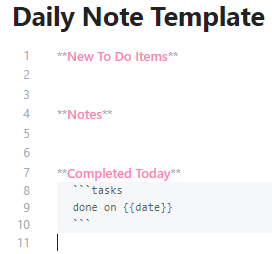
Each day, as I work through stuff, I add Notes. Usually, these are short bullet
lists. If a new To Do items emerges, it goes on top. Use the markdown syntax:
This is rendered as:

Tags (here: #mcs) are very helpful in filtering, and a lot of Obsidian’s strength comes from using tags appropriately.
The beauty is that I can now easily run an overview of pending TODO items.
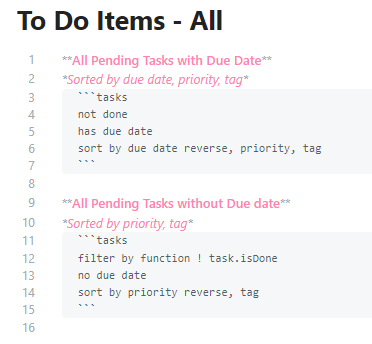
This is rendered as:

The hyperlink connects me back to the note in which the To Do item was
created and lets me establish context. The due date is sortable, searchable,
and filterable. It is trivial to create a report on ‘Items due today’, for example.
By checking the box, the item is marked as completed. In the note that
created the, the box is checked too and the completion date is added.

In today’s daily note, the issue is included as “completed today”!

Lastly: Obsidian stores everything as Markdown files. Even if the tool will
eventually go away, I’ll still have all of this easily greppable!
22 Dec 2023
I have been following @mako for quite a while now. He generally writes insightful posts about lots of different things. The most recent item that caught my attention was his “Things I Like” report for 2023. In it, he mentions an “Inbox Allow List”. The idea was attributed to a post by Omar Shahine in which he describes the idea.
I have been struggling with keeping on top of relevant email too. Even though I have a ton of Gmail filters set up already to manage my workflow, this was one that I couldn’t figure out easily. Gmail filters are great, but they do have their limitations!
I have bemoaned the loss of procmail in the past. This time around, timing was good. Classes are over for the semester, and I have a bit of time on my hands. Time to take a look at the Gmail API.
Based on Google’s demo code, I threw together a quick solution: Gmail Purgatory was written in about an hour. The script is a bit ugly, but I might clean it up as time goes on.
For now, the goal is to manage email as follows:
Stage 1 filtering via Gmail rules that will ‘tag’ incoming messages with mailing list labels and never let them hit my Inbox, and which take care of spam filtering.
Stage 2 filtering is that script listed above. It will run every 15 minutes or so when I care enough to be looking at work email (7am - 8pm or so). It takes all email that did make it into my Inbox after stage 1 filtering and moves it into purgatory. Only messages that are specifically allow-listed will remain in my Inbox.
Stage 3 is manual filtering.
That means that my main workflow will now include messages tagged as:
-
00 - Purgatory; I’ll get to these when I get to them. All messags end up in purgatory based on my script.
-
01 - Follow Up; Manually moved here after I decide that I need to hold on to this for further action.
-
02 - Incoming; This contains one sub-label for each mailing list. They gets reviewed based on what the list is for. Most sit there and get scanned once every other week or so; some are monitored more closely. Messages in this label are tagged by Gmail filters.
When email needs to be retained for archival purposes, I’ll remove all labels. In Google’s world, no labels means that they are archived.
I’d be interested in seeing how that plays out, and how I’ll end up tweaking it more.
23 Feb 2023
Midterms are here again and now that the results are in, students are likely to
be more receptive to learning tips than before. A lower-than-expected grade
tends to work that way.
So: here we go.
#The bigger picture of college courses
When you take classes, you are expected to master three domains:
a. Knowledge, such as facts and definitions. Often achieved through textbook
readings and lectures.
b. Understanding, such as correlations and causations. Often achieved through
class discussion and lab packets.
c. Skill, such as the ability to apply knowledge and understanding to a given
situation. Often achieved through exercises and assignments.
Knowledge and understanding is tested through exams.
#How to participate in courses
-
At the beginning of each week look over the week’s lesson. Review the
week’s learning goals and look through the readings (textbook, slides, and
supplemental reading). Make time for this and calendar it.
-
During lecture time, take rough quick notes. Focus on being an active
listener first. After lecture time, write out (preferably with a pen on paper)
your notes and supplement them with your reading. Schedule time to do that
the same day and preferably immediately after class. When you are done, you
should have a weekly summary.
-
You can use somebody else’s quick notes if you miss class, but never rely
on them for studying. Always make your own like in the previous step.
-
If you have questions about lecture or readings, write them down and come
to office hours. Professors actually like it when prepared students show up
and ask questions.
-
Before lab time, review the assignment to make sure you understand it. Come
up with a rough plan to solve it.
-
During lab time, apply the lessons through the lab packets, be an active
participant, and ask questions about assignments and exercises.
-
Complete and submit assignments before the deadline.
-
At the end of the week, review the learning goals again and make sure you
are good to go.
#Do I really need the required textbooks and do the required readings?
Yes, that’s what the word ‘required’ means.
#How much time does this take?
For Computer Science classes, you should set aside 2-3 hours of additional
time for every hour in class. For graduate classes, that can be more.
Example: a 3-credit undergraduate class meets for 3 hours a week (yes, we
pretend that 50 minutes is an hour. Roll with it). That means you should budget
an additional 6-9 hours for each class.
Does that seem a lot? Yes. That’s what being a fulltime student means.
15 credits = 15 hours per week in class + 30-40 hours per week on assignments.
Computer Science is hard. Get used to it.
How do I prepare for exams?
If you followed the participation guidelines above, studying should be easy.
For all topics covered in the exam, review your notes, the weekly learning
goals and the assignments. If that all works out, you’re pretty much done.
If you feel that there are gaps in your knowledge, understanding or skill, work
on remediating them (before the exam!) If you don’t wait with studying to th
elast second and you have questions, you might even go ask your professor (!)
If you need to memorize definitions and facts, write them down with a pen on
paper a few times. Typing them on a computer is much less effective.
How do I take exams?
Step 0: Prepare. See above.
Step 1: Don’t panic. The best way to do that is by being prepared. See step 0.
Step 2: Put your name on the exam. Yes, right away!
Step 3: Before you start answering questions, briefly look through the entire
test to know what you can expect.
If a question is unclear, call over the instructor or proctor and ask for
clarification.
Step 4: Budget your time. Consider:
-
Some questions take more time than others.
-
Some questions are worth more points than others.
-
Some questions you know that you won’t be able to do easily. Keep them for
last.
Step 5: Always answer all questions. Worst case scenario, you’re wrong and get
no points. Best case scenario, you are correct and you get full points. Most
of the time, you’ll be at least partially correct and you’ll get partial
credit. Remember: 2/10 is still more than 0/10!
-
Before moving on, check the question and make sure you answer all elements
that are being asked! Unanswered sections get no points!
-
If you’re stuck on a question, mark it for follow-up and go on to the next
problem. Come back at the end, if you have time left.
-
Don’t second-guess yourself. If you’re not absolutely convinced that your
answer is wrong, keep it.
-
Write legibly. An unreadable answer will not get points.
Step 6: Put your name on the exam! Yes, you’d be surprised…
Don’t cheat. At least in my classes, there is only one consequence for
cheating, and that is failing the course.
#What’s the difference between graduate classes and undergraduate classes?
In undergraduate classes, you are taught most of the materials you need to
master. Readings and exercises supplement the lecture.
In graduate classes, you study most of the materials yourself. Lectures
supplement reading and exercises.
In other words: graduate students are guided through the materials by the
course design and the instructor is there to help. Undergraduate students are
taught and given specific direction.
19 Jan 2023
The new academic term is about to kick off. Here is what I have to say about #ChatGPT and friends
ChatGPT is a tool that can generate content, ranging from essays to computer software. It can also explain in natural language what code does. There are other tools like ChatGPT, and more will be developed. The following applies to all of them.
I am not naïve enough to believe that you don’t know about it, and that you won’t use it. I can make all the rules I want, or put in all the technical controls to block or detect it. They simply won’t work. These tools are here to stay, and they’ll only get better with time.
So, let me give some guidance:
Homework is meant to help you further develop the skills to think through a problem, analyze what is asked, design a solution, and execute that solution. It is a reinforcement activity meant to support what we cover during lessons. Homework is not about the final product. It is about how you got there.
Can ChatGPT solve your homework? Yes, it likely can.
None of the homework I assign is particularly original, so most solutions are probably easily findable via StackOverflow anyway.
Should you use ChatGPT to solve your homework?
Well. That depends.
First: all academic integrity rules apply. If you use ChatGPT, you must tell me.
Second: if you hand in a homework solution, you take ownership and accountability for it. If you cannot explain why you made decisions, or how you implemented certain constructs, you are likely not getting credit (best case). You might even end up in trouble for academic integrity violations (worst case).
Third: if your focus is exclusively is on the final deliverables, you don’t learn. If you don’t learn, your tuition is wasted, and you’ll fail the sit-down written exams anyway.
If you want to use ChatGPT to support your learning by having it give you examples or explaining stuff, or if you want to use it to verify your answers, go ahead and do so. Tell me about it! I am genuinely interested in how it works out for you.
One final word of caution: like anything on the Internet, ChatGPT makes mistakes. Don’t blindly accept what it tells you as the truth. When in doubt, my opinion about the validity or the truth of a statement matters more than what some internet-based thing says.
This article was also posted to Mastodon. Find the post here.